Wednesday, January 16, 2019

WHAT IS A NETWORK ADDRESS?


NETWORK ADDRESS


Is more commonly known as IP ADDRESS. It is the numeric address of a computer connected to the network. It is a set of numbers, called as "octets" or "dotted decimal" notation that identifies any network device.       


It can be compared to the physical address that we use for our homes which uniquely identifies it from the rest of the homes in our neighborhood, town, city, province, country and the whole wide world.


EXAMPLES:
                
                     
   -172.16.254.1
                  -192.168.1.1


WHAT ARE THE VERSIONS OF IP ADDRESS? 

There are two versions of IP that currently coexist in the global Internet: IP version 4 (IPv4) and IP version 6 (IPv6). IP addresses are made up of binary values and drive the routing of all data over the Internet. IPv4 addresses are 32 bits long, and IPv6 addresses 128 bits long.


                    1. IPv4- IP version 4
                           - It is the standard version

                    2. IPv6 - IP version 6
                           - It is the advanced version

IPv4 addresses are canonically represented in dotted-decimal notation, which consists of four decimal numbers, each ranging from 0 to 255, separated by dots, e.g., 172.16.254.1. Each part represents a group of 8 bits (octet) of the address.


BINARY DIGITS OF 172

WHAT ARE THE CLASSES OF IP ADDRESS?

With an IPv4 IP address, there are five classes of available IP ranges: Class A, Class B, Class C, Class D and Class E, while only A, B, and C are commonly used. Each class allows for a range of valid IP addresses, shown in the table below.


Note:


127 - is the loop back function of a network

CLASS D - is for multicast

CLASS E - is reserved for future or experimental purpose

HOW TO CREATE IP ADDRESS?

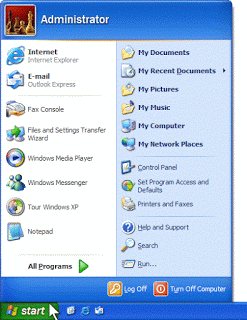
1. Right click My Network Places


2. Click Properties


3. Right click Local Area Connection


4.  Click Properties


5. Click TCP/IP


6. Click Properties


7. Click OK


IP CONFIGURATION

1. Click Start Button


2. Click Run


3. Type cmd


4. Type ipconfig


5. Type ping[ IP address]


Monday, October 8, 2018

WHAT ARE THE TYPES OF CABLE?


CABLE


 ~ Alternatively referred to as a cord, connector or plug, a cable is one or more wires covered in a plastic covering that allows for the transmission of power or data between devices. The picture is an example of what the power cord may look like for your computer or monitor. The power cord is just one example of thousands of other cables found in and around computers.


TYPES OF CABLE

A.           TWISTED PAIR

~ Twisted pair is the ordinary copper wire that connects home and many business computers to the telephone company. To reduce crosstalk or electromagnetic induction between pairs of wires, two insulated copper wires are twisted around each other.
There are 2 types of twisted pair cable, they are:


a.)           STP (Shielded Twister Pair)

~ is a special kind of copper telephone wiring used in some business installations. An outer covering or shield is added to the ordinary twisted pair telephone wires; the shield functions as a ground.

b.)           UTP (Unshielded-Twisted Pair)

~is most certainly by far the most popular cable around the world. UTP cable is used not only for networking but also for the traditional telephone(UTP-Cat 1).

  • ▄▄▄▄▄▄▄▄▄▄▄▄▄▄▄▄▄▄▄▄▄▄▄▄▄▄▄▄▄▄▄▄▄▄▄▄▄▄▄▄▄▄▄▄▄▄▄▄

B.           COAXIAL

~Coaxial cable, or coax is a type of electrical cable that has an inner conductor surrounded by a tubular insulating layer, surrounded by a tubular conducting shield. Many coaxial cables also have an insulating outer sheath or jacket. The term coaxial comes from the inner conductor and the outer shield sharing a geometric axis.


C.    FIBER OPTIC

~An optical fiber cable, also known as a fiber optic cable, is an assembly similar to an electrical cable, but containing one or more optical fibers that are used to carry light. The optical fiber elements are typically individually coated with plastic layers and contained in a protective tube suitable for the environment where the cable will be deployed. 


WHAT IS THE DIFFERENCE BETWEEN STRAIGHT-THROUGH CABLE AND CROSS-OVER CABLE?


        STRAIGHT-THROUGH         CROSS OVER


Straight-through- it is used to connect DIFFERENT DEVICES.

Crossover- it is used to connect SAME TYPE OF DEVICES.


Friday, October 5, 2018

WHAT ARE THE TYPES OF NETWORK TOPOLOGY?


NETWORK TOPOLOGY


 A network topology is the arrangement of a network, including its nodes and connecting lines. There are two ways of defining network geometry: the physical topology and the logical (or signal) topology.


TYPES OF NETWORK TOPOLOGY

1.) LINEAR BUS TOPOLOGY
2.) STAR TOPOLOGY
3.) RING TOPOLOGY
4.) MESH TOPOLOGY
5.) HYBRID TOPOLOGY

  • »»————————————————- ★ ————————————————-««


1.) LINEAR BUS TOPOLOGY

~Linear bus topology is a type of network topology in which each device is connected one after the other in a sequential chain (shown right). In this case, the bus is the network connection between the devices, and if any link in the network chain is severed, all network transmission is halted.


2.) STAR TOPOLOGY

~A Star network is one of the most common computer network topologies. In its simplest form, a star network consists of one central hub which acts as a conduit to transmit messages. In star topology, every host is connected to a central hub.


3.) RING TOPOLOGY

~A ring network is a network topology in which each node connects to exactly two other nodes, forming a single continuous pathway for signals through each node along the way handling every packet.


4.) MESH TOPOLOGY

~A mesh network is a
local network topology in which the infrastructure nodes connect directly, dynamically and non-hierarchically to as many other nodes as possible and cooperate with one another to efficiently route data from/to clients. This lack of dependency on one node allows for every node to participate in the relay of information.


5.) HYBRID TOPOLOGY

~Hybrid topology is an integration of two or more different topologies to form a resultant topology which has many advantages (as well as disadvantages) of all the constituent basic topologies rather than having characteristics of one specific topology.


Thursday, August 2, 2018

WHAT ARE THE TYPES OF COMPUTER NETWORK?

                                
           - Important Words

Computer Network

 A computer network is a set of connected computers. Computers on a network are called nodes. The connection between computers can be done via cabling, most commonly the Ethernet cable, or wirelessly through radio waves. Connected computers can share resources, like access to the Internet, printers, file servers, and others. A network is a multipurpose connection, which allows a single computer to do more. © en.wikipedia.org


Types Of Computer Network


1.Personal Area Network (PAN)


   A personal area network (PAN) is a computer network for interconnecting devices centered on an individual person's workspace. A PAN provides data transmission amongst devices such as computers, smartphones, tablets and personal digital assistants. PANs can be used for communication amongst the personal devices themselves, or for connecting to a higher level network and the Internet where one master device takes up the role as gateway. A PAN may be carried over wired computer buses such as USB.  © en.wikipedia.org

If there is a personal area network (PAN) that is carried over wired computer buses such as USB, there is also a wireless version of it. It is called Wireless Personal Area Network.


 A WPAN (wireless personal area network) is a personal area network - a network for interconnecting devices centered around an individual person's workspace - in which the connections are wireless. Typically, a wireless personal area network uses some technology that permits communication within about 10 meters - in other words, a very short range. One such technology is Bluetooth, which was used as the basis for a new standard, IEEE 802.15. © searchmobilecomputing.techtarget.com


2. Local Area Network (LAN)

       A local area network (LAN) is a computer network that interconnects computers within a limited area such as a residence, school, laboratory, university campus or office building. By contrast, a wide area network (WAN) not only covers a larger geographic distance, but also generally involves leased telecommunication circuits.

Ethernet and Wi-Fi are the two most common technologies in use for local area networks. Historical technologies include ARCNET, Token Ring, and Apple Talk. © en.wikipedia.org

Let’s now proceed to its wireless version…

      A wireless local area network (WLAN) is a wireless distribution method for two or more devices that use high-frequency radio waves and often include an access point to the Internet. A WLAN allows users to move around the coverage area, often a home or small office, while maintaining a network connection.
A WLAN is sometimes call a local area wireless network (LAWN). © www.techopedia.com

3. Metropolitan Area Network (MAN)
                                                                                                                           A metropolitan area network (MAN) is a computer network that interconnects users with computer resources in a geographic area or region larger than that covered by even a large local area network (LAN) but smaller than the area covered by a wide area network (WAN). The term MAN is applied to the interconnection of networks in a city into a single larger network which may then also offer efficient connection to a wide area network. It is also used to mean the interconnection of several local area networks in a metropolitan area through the use of between them. © en.wikipedia.org

Wait... if there's a WPAN and WLAN, is there a WMAN?


OH HELL YES! Let's proceed to that...

↓


   Wireless metropolitan area networks (WMANs) enable users to establish wireless connections between multiple locations within a metropolitan area (for example, between multiple office buildings in a city or on a university campus), without the high cost of laying fiber or copper cabling and leasing lines. In addition, WMANs can serve as backups for wired networks, should the primary leased lines for wired networks become unavailable. WMANs use either radio waves or infrared light to transmit data. Broadband wireless access networks, which provide users with high-speed access to the Internet, are in increasing demand. © web.mst.edu

2. Wide Area Network (WAN)

    A wide area network (WAN) is a telecommunications network or computer network that extends over a large geographical distance/ place. Wide area networks are often established with leased telecommunication circuits.
Business, education and government entities use wide area networks to relay data to staff, students, clients, buyers, and suppliers from various locations across the world. In essence, this mode of telecommunication allows a business to effectively carry out its daily function regardless of location. The Internet may be considered a WAN. © en.wikipedia.org


The largest of all, will this have a wireless one?


Yes! It has as well! Let's discuss it...

Wireless Wide Area Network (WMAN)


WWANs have been in place since the early 1980s for voice communication, and since the early 1990s for data communication. Access to these networks requires users to sign an agreement with the company that operates the network they are interested in. This agreement will allow them to use the wireless network for a fee, which is often calculated by the number of minutes the user is connected to the network, or more recently, by the amount of data transferred over the network. This fee helps the service provider cover the cost of building and maintaining the wide area network, as well as the cost required to purchase the spectrum used for communication.